Finance & Accounting ERP
Accounting Software in Pakistan for Purchasing, Sales & Inventory
Manage purchasing, sales, inventory and accounts in EZ Books. From purchase requests and invoices to payments and financial reports, your transactions stay connected to one ledger.
Built and supported by Digital Hyperlinks, Karachi.
Built here
Accounting and ERP software built for businesses in Pakistan.
Written and supported in Karachi by Digital Hyperlinks. Sales tax invoicing, party ledgers and rupee reporting are how the system works, not a regional setting bolted onto software built for somewhere else.
Purchasing, sales, inventory and the ledger are one system. A figure entered on a purchase order is the same figure on the trial balance, so the month closes from the documents your team already raised.
Who runs on it
Eleven businesses close their month in EZ Books.
Telecoms, hosting, energy, shipping, manufacturing and non-profits. Different books, one ledger underneath.


and 5 more
The problem
Finance teams lose the month to the books, not the business.
Three things slow every growing finance department down. EZ Books is built around fixing them.
Manual entry eats the month
Vouchers, invoices and ledgers are captured once and flow through the books automatically, with no re-keying the same figure into three places.
No real-time view of the numbers
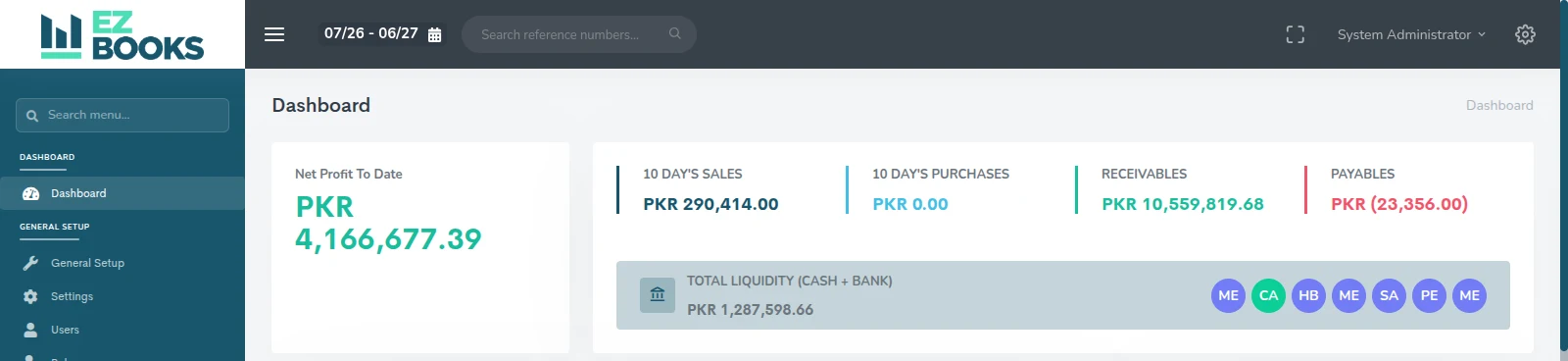
Balances, receivables and payables update as transactions post, so the position you report is the position you are actually in.
Compliance risk at closing
Every entry is traceable to its source document, giving a clean audit trail when the auditors and tax filings come around.
Our modules
Procure to pay, order to cash, and the reports that close the month.
Every module posts to the same ledger, so a figure entered on a purchase order is right on the balance sheet.
Purchasing & Payables
Purchase requests, RFQs, vendor quotations, purchase orders, receiving, purchase vouchers and purchase returns, with an approval process where you need one.
Sales & Receivables
Sales requests, quotations, sales orders, invoices with or without tax, deliveries, the sales book and sales returns. Receivables update as documents post.
Inventory & Stock Control
Products, services, categories, brands and variations, plus stock updates, stock transfers, bulk product updates and warranty tracking.
Chart of Accounts & Ledgers
A configurable chart of accounts with journal vouchers, general ledger, party ledger and trial balance, including a party-wise trial balance.
Banking & Cash
Bank, cash and general vouchers, bank transfers, and a live view of total liquidity across cash and bank accounts.
Financial Reports
Profit & loss, balance sheet, trial balance, cash flow summary, and bank & cash reporting, with sales, purchase, commission and stock reports alongside.
Tax & Compliance
Tax setup applied across documents, parallel with-tax and without-tax document flows, sales and purchase books, and full activity logging.
Import & Export
Import and export invoicing for businesses trading across borders, sitting on the same ledger as the rest of the books.
Production & Jobs
Production documents, job tracking with upcoming billings, employee records, and product-wise profit reporting on completed work.
How it works
Follow one invoice all the way to the accounts.
Three screens from the working system, in the order the work happens.
-
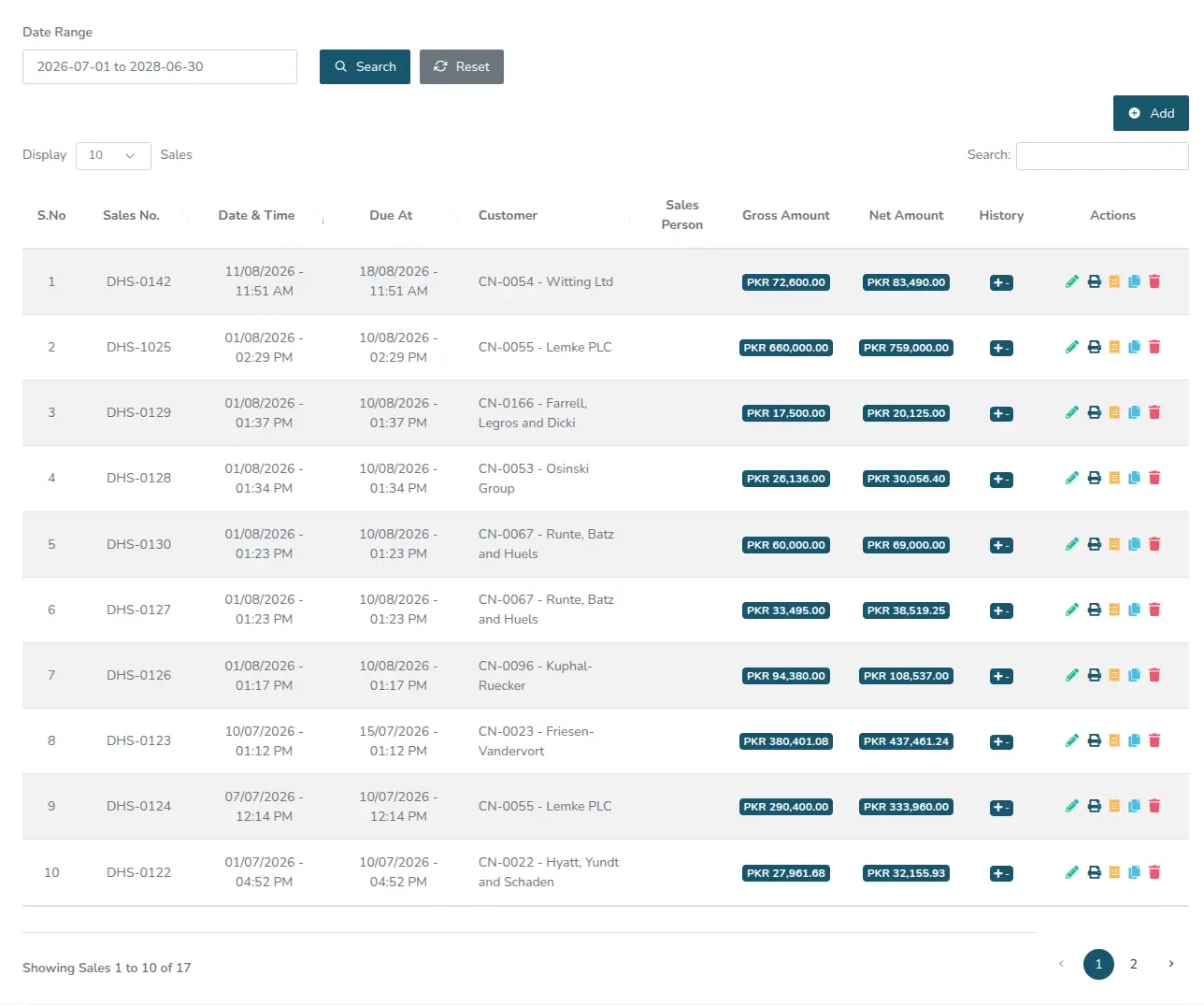
01 · Raise it
Bill the customer once.
Reference, due date, tax and net amount are entered on one screen and read by everyone downstream. No second spreadsheet to keep in step.
Swipe the screen to read across
-
02 · Post it
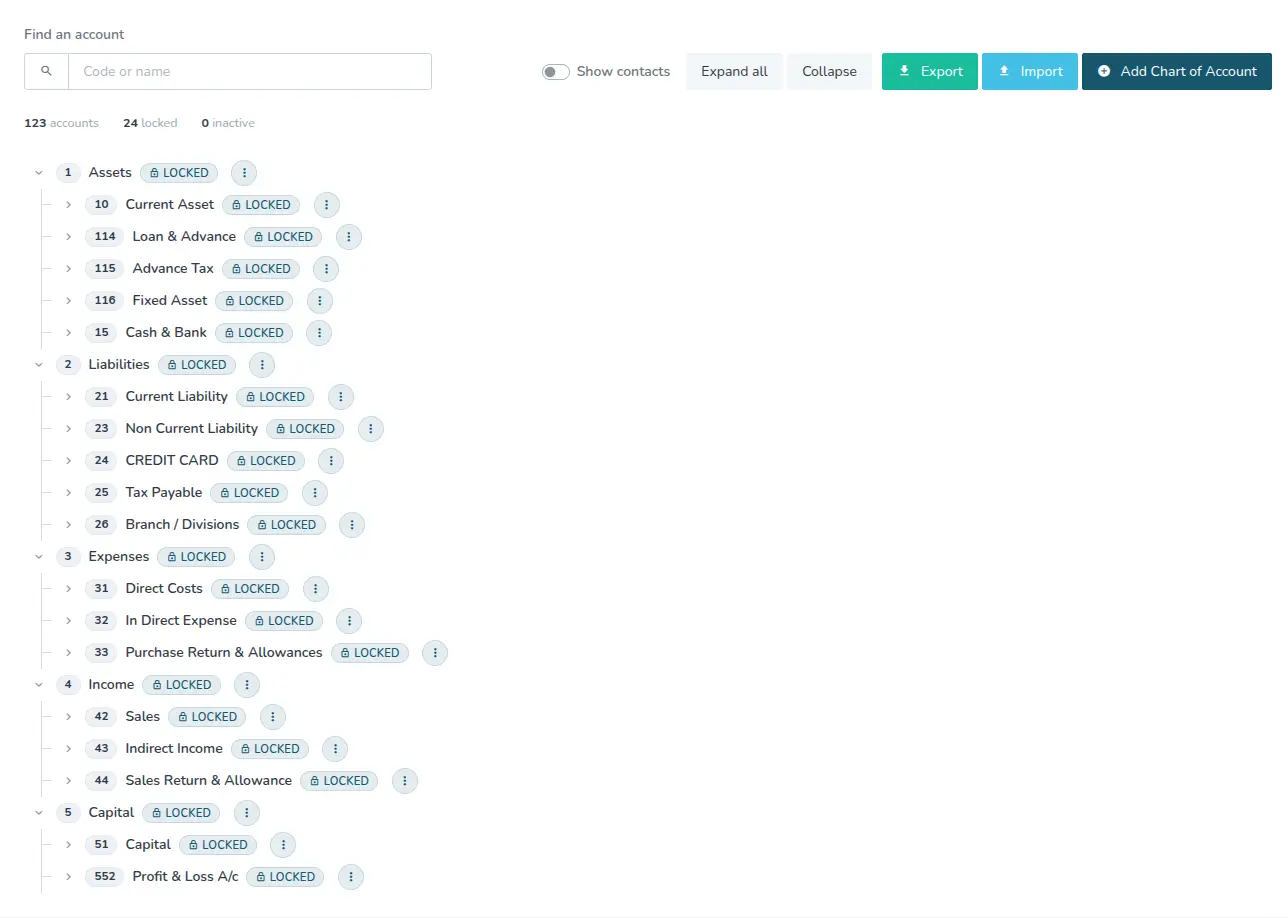
It lands on the chart of accounts.
Every document posts against the same account tree: assets, liabilities, expenses, income, capital. Accounts you rely on can be locked so they stay put.
Swipe the screen to read across
-
03 · Read it
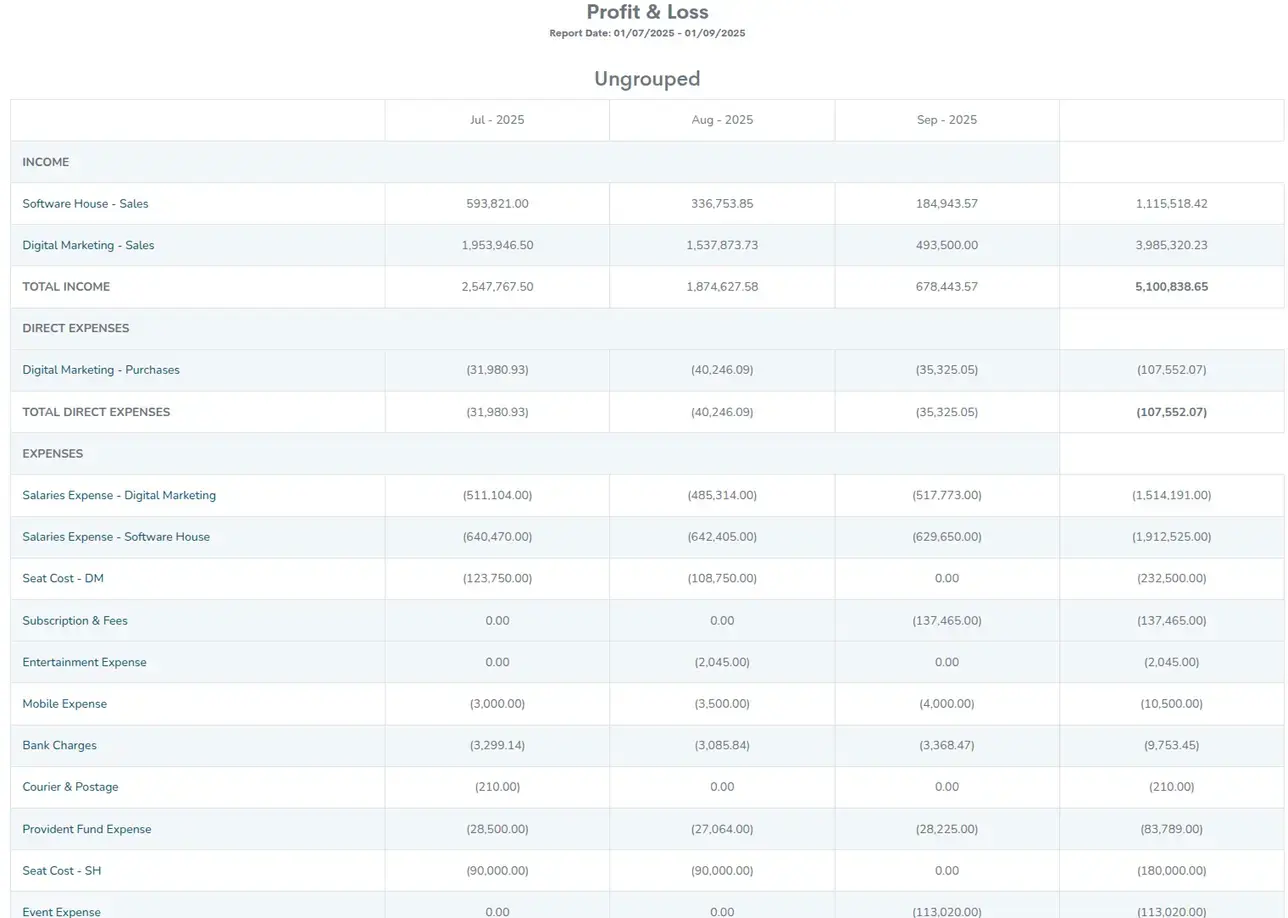
Month end is a page, not a project.
Profit and loss across any month range, month by month with a running total, built from the entries your team already made. Export it to PDF or Excel when the auditor asks.
Swipe the screen to read across
“I must say that their expertise has proved to be a game-changer for my business. The tangible results make me more satisfied in terms of utilizing my investment in the right way. Kudos to their team!”
“Closing used to take us the first ten days of every month. We now sign off the trial balance on day three, and nobody is re-keying invoices to get there.”
“Our auditors asked for the source document behind a posting from last March. It took one click. That alone paid for the year.”
Questions
Frequently asked.
- Request a demo and our team walks you through the system against your own workflow, then answers questions live. There is no obligation and no card required.
- Pricing depends on the modules you use and the size of your team, so we quote per organisation rather than publishing a fixed tier. Ask for a quote and we will come back with a figure.
- The system is built and supported by Digital Hyperlinks, so the chart of accounts, document formats and reporting can be configured to your organisation during onboarding.
- Yes. Opening balances and master data such as accounts, customers and suppliers are migrated as part of onboarding. Bring a sample export to the demo and we will confirm the fit.
- You do. Your data stays yours, is not shared with other customers, and can be exported at any time.
- Digital Hyperlinks supports the product directly, so you deal with the team that builds it, not a reseller. Training for your finance staff is part of the rollout.
- EZ Books is part of the same family as EZ HR, EZ Commerce and EZ Club Master, so organisations already running one of those are on familiar ground.
See EZ Books against your own books.
A short walkthrough with our team, no obligation. Tell us how you work today and we will show you what changes.
Book a Demo